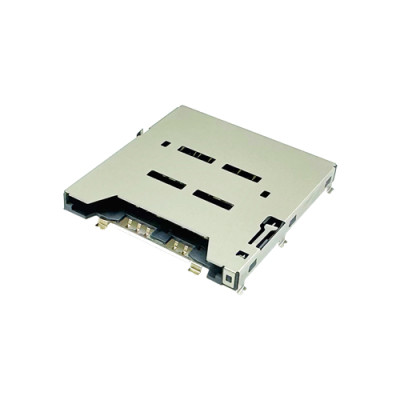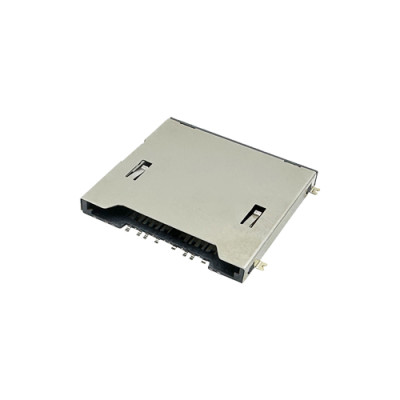
Micro SD Card Connectors: A Complete Guide to Pins, SPI Wiring, and PCB Design
Micro SD Card Connectors: A Complete Guide to Pins, SPI Wiring, and PCB Design
Engineering Notes | Hardware Design Guide
Micro SD cards are widely used in embedded systems, industrial electronics, IoT devices, data loggers, cameras, and portable equipment. However, integrating a Micro SD card into a reliable product involves more than connecting eight contact pins. Engineers also need to consider interface selection, signal mapping, power supply compatibility, PCB footprint accuracy, card detection, mechanical retention, and long-term contact reliability.
This engineering guide explains the Micro SD card connector pinout, how to connect a microSD card through SPI, and what to check when designing the PCB. It also covers common hardware integration mistakes and practical connector selection considerations for product development.
For engineers developing compact electronic products, MOARCONN provides Micro SD Card Connectors and customized card socket solutions to support different mechanical layouts, insertion mechanisms, and application requirements.
In this guide, you will learn:
The function of each of the eight microSD card contacts
How microSD pins map to SPI signals
The differences between SPI mode and native SD bus mode
How to verify a Micro SD Card Connector PCB footprint
How card detection switches work
How to troubleshoot common microSD interface problems
How to select a suitable Micro SD Card Connector for your project
1. What Is a Micro SD Card Connector?
A Micro SD Card Connector is an electromechanical interface that connects a removable microSD memory card to a host circuit. It provides the physical contacts needed to transfer power, commands, clock signals, and data between the card and the host device.
Unlike the memory card itself, the connector is a PCB-mounted component. Its contact geometry, terminal plating, insertion mechanism, mounting structure, and card retention features can all affect the reliability of the finished product.
Micro SD Card Connectors are commonly used in:
Industrial controllers and data acquisition equipment
IoT gateways and embedded computing systems
Security cameras and video recording devices
GPS trackers and telematics equipment
Consumer electronics and portable devices
Communication equipment and remote monitoring systems
Depending on the application, engineers may choose a push-push, push-pull, or hinged connector design. The most suitable option depends on the available board space, card access requirements, enclosure design, and expected insertion and removal frequency.
MOARCONN offers a range of Micro SD Card Connectors, with customization options for insertion mechanisms, materials, plating, dimensions, and other application-specific requirements.
Explore the MOARCONN Micro SD Card Connector product range to compare available connector solutions.
2. Micro SD Card Connector Pinout: Understanding the Eight Contacts
A standard microSD card has eight electrical contacts. Their functions depend on the communication mode selected by the host controller.
The same physical contacts support the native SD interface and SPI mode, but their signal assignments are not identical in every mode.
2.1 Micro SD Card Pinout Table
The following table shows the standard eight-contact mapping.
| Contact No. | Signal Name | Native SD Mode | SPI Mode |
| 1 | DAT2 | Data line 2 | Not used for standard SPI data transfer |
2 | DAT3 / CS | Data line 3 | Chip Select (CS) |
3 | CMD | Command line | MOSI / DI |
4 | VDD | Power supply | Power supply |
5 | CLK | Clock | SCK |
6 | VSS | Ground | Ground |
| 7 | DAT0 | Data line 0 | MISO / DO |
| 8 | DAT1 | Data line 1 | Not used for standard SPI data transfer |
Important: The table describes the card's standard electrical contacts, not every terminal on a physical connector. A Micro SD Card Connector may also have additional terminals for card detection, shell grounding, or mechanical support.
Always verify the exact connector's terminal numbering against its manufacturer datasheet.
2.2 What Does Each Micro SD Pin Do?
Pin 1 — DAT2
DAT2 carries data in the native SD interface. It is not one of the standard data signals used for SPI transfers.
Pin 2 — DAT3 / CS
DAT3 is a data signal in native SD mode. In SPI mode, the same contact serves as the Chip Select (CS) input, often called Slave Select (SS).
The host uses this signal to select the card for SPI communication. In typical SPI implementations, the card is selected by driving CS low.
Pin 3 — CMD
CMD carries command information in native SD mode. In SPI mode, it becomes the data input to the card, commonly called MOSI (Master Out, Slave In).
Pin 4 — VDD
VDD supplies power to the memory card. The power rail must meet the electrical requirements of the specific card and interface implementation.
Do not assume that every host GPIO voltage is safe for a microSD card. Check both the card's supported operating conditions and the host controller's I/O voltage.
Pin 5 — CLK
CLK provides the clock signal used to synchronize communication between the host and the card. In SPI mode, it corresponds to SCK.
Pin 6 — VSS
VSS is the card's ground reference. It connects to the system ground through the connector and PCB design.
Pin 7 — DAT0
DAT0 carries data in native SD mode. In SPI mode, it becomes the card's data output, commonly called MISO (Master In, Slave Out).
Pin 8 — DAT1
DAT1 is used as a data signal in native SD mode. It is not required for standard SPI data transfers.
For a detailed reference, see the Microchip microSD Card Connector documentation and the Analog Devices SD card SPI application note.
3. How to Connect a Micro SD Card Connector in SPI Mode
SPI is a practical interface choice when a microcontroller does not have a dedicated SD or SDIO host controller, or when implementation simplicity is a priority.
In SPI mode, the standard microSD contacts map to four primary interface signals, plus power and ground.
3.1 SPI Wiring Table
| Micro SD Contact | SPI Signal | Host Controller Signal | Direction Relative to Card |
| 2 | CS | Chip Select / SS | Input |
3 | CMD | MOSI / DI | Input |
4 | VDD | Compatible power rail | Power |
5 | CLK | SCK | Input |
6 | VSS | GND | Ground |
7 | DAT0 | MISO / DO | Output |
DAT1 and DAT2 are not used for standard SPI data transfers.
3.2 Basic SPI Connection Steps
Step 1: Connect power and ground.
Connect VDD to a supply that satisfies the card's operating specifications and connect VSS to the system ground.
Step 2: Connect the clock signal.
Connect the host's SPI clock output (SCK) to contact 5, CLK.
Step 3: Connect MOSI.
Connect the host's MOSI output to contact 3, CMD.
Step 4: Connect MISO.
Connect contact 7, DAT0, to the host's MISO input.
Step 5: Connect chip select.
Connect contact 2, DAT3/CS, to a suitable host GPIO or SPI chip-select output. Ensure that the signal is inactive during bus initialization when required by the selected implementation.
Step 6: Verify electrical compatibility.
Confirm logic voltage compatibility, startup timing, signal pull-ups where required, and the host controller's SPI configuration before powering the board.
3.3 Pull-Up Resistors and Signal Integrity
Pull-up requirements depend on the interface mode, the card specification, and the host implementation. Native SD interfaces commonly require appropriate pull-ups on specified signal lines. SPI implementations also need a well-defined chip-select state and must follow the applicable electrical requirements.
Do not add resistors indiscriminately or assume that every connector breakout circuit is suitable for a production PCB. Check the host controller reference design, the card requirements, and any components already integrated into the circuit.
For a design review, confirm:
Whether the host requires external pull-ups
Whether CS has a defined inactive state
Whether the host and card use compatible logic levels
Whether the power rail remains stable during card initialization and data transfers
Whether the signal routing is appropriate for the intended clock frequency
3.4 Micro SD SPI Initialization: What Should Engineers Check?
Correct wiring is necessary, but it does not guarantee successful card initialization.
When debugging an SPI interface, verify the following:
1.The card receives power within its specified operating range.
2.The host provides the required startup and initialization sequence.
3.CS, SCK, MOSI, and MISO are connected to the correct pins.
4.The SPI clock configuration follows the card initialization requirements.
5.The host checks card responses and reports initialization errors.
6.The firmware supports the card type and capacity used during testing.
The Analog Devices AN-1443 application note provides an implementation example covering SPI signals, command-response behavior, and embedded SD card integration.
4. SPI Mode vs. Native SD Bus Mode
Both SPI and native SD bus modes use the microSD card's physical contacts, but they differ in signaling and host requirements.
| Design Consideration | SPI Mode | Native SD Bus Mode |
| Host interface | Standard SPI peripheral or suitable software implementation | SD/SDIO-capable host interface |
Data signals | One input and one output data path | One or more native SD data lines |
Implementation | Often simpler for basic embedded projects | Requires compatible host hardware and driver support |
Throughput | Depends on host, card, clock, and implementation | Can support higher throughput depending on the supported mode |
| Typical use | Simple data logging and lower-complexity embedded designs | Applications requiring greater storage bandwidth |
Which interface should you choose?
Choose SPI when the host supports SPI but lacks a native SD controller, or when implementation simplicity is more important than maximizing throughput.
Consider native SD or SDIO when the MCU or processor supports it and the application requires higher data-transfer performance.
Actual performance depends on the card, host controller, bus mode, clock configuration, firmware, and PCB implementation. Do not assume a fixed speed advantage without considering the complete system.
5. Micro SD Card Connector PCB Footprint and Layout Design
A correct electrical pinout is only one part of the design. The physical connector footprint must also match the exact component selected for manufacturing.
An incorrect footprint can cause soldering problems, card insertion interference, mechanical instability, or a complete board redesign.
5.1 Verify the Manufacturer's Recommended Footprint
Before creating a PCB library component, obtain the latest datasheet and mechanical drawing for the exact connector part number.
Check the following:
Contact numbering and pad assignment
Pad dimensions and pitch
Mounting tabs and mechanical anchor points
Connector outline and card insertion direction
Board-edge clearance, if applicable
Required copper keep-out areas
Shell grounding terminals
Component height and enclosure clearance
Do not reuse a footprint from a visually similar connector without checking its dimensions and pin mapping.
5.2 Consider the Mechanical Insertion Mechanism
Micro SD Card Connectors may use different insertion and retention mechanisms, including push-push, push-pull, and hinged designs.
The mechanism affects how users insert and remove the card, the clearance required around the slot, and the overall mechanical design.
For example, a connector mounted close to an enclosure wall may require a different insertion direction or a lower-profile configuration than one installed on an open development board.
MOARCONN provides Micro SD Card Connector options with different insertion mechanisms and customizable mechanical features. Engineers can review the available configurations and discuss requirements for compact or application-specific designs.
Explore the MOARCONN Micro SD Card Connector range.
5.3 Plan for Signal Routing and Grounding
For reliable operation:
Keep clock and data routing appropriate for the intended interface frequency.
Maintain a suitable ground reference beneath signal traces.
Avoid unnecessary routing detours and stubs.
Keep sensitive signals away from significant noise sources where practical.
Provide adequate local power-supply decoupling according to the circuit design.
Review the connector shell grounding strategy and the system's ESD protection requirements.
Higher-speed native SD interfaces may require more careful signal-integrity analysis than low-speed SPI implementations. Follow the processor manufacturer's layout guidance and the requirements of the selected operating mode.
5.4 Account for Assembly and Mechanical Reliability
The connector should remain mechanically stable throughout manufacturing and use.
During design review, check:
Whether the mounting tabs and solder terminals match the PCB footprint
Whether the connector is adequately supported during card insertion and removal
Whether the card can be inserted and removed without interference
Whether the enclosure permits the required card access
Whether the selected connector is compatible with the intended assembly process
6. Micro SD Card Detection Switch: Design and Troubleshooting
Some Micro SD Card Connectors include a mechanical card-detection switch. This switch allows the host to determine whether a card is inserted without attempting to communicate with the card first.
However, the switch is not a universal feature, and its electrical behavior varies between connector models.
6.1 How Card Detection Works
Depending on the connector design, card detection may use:
A normally open switch
A normally closed switch
A switch that changes state when the card is inserted
An external detection mechanism implemented by the host system
The exact logic depends on the switch terminals and the circuit connected to them.
Some connector designs close a switch when the card is inserted; others use a different contact arrangement. Therefore, do not assume that a logic-high or logic-low state always means the same thing across all connectors.
6.2 How to Connect the Detection Switch
Before wiring a card-detect circuit:
Identify the switch terminals in the connector datasheet.
Check the contact state with no card inserted.
Check the contact state with a card inserted.
Select an appropriate pull-up or pull-down arrangement for the host input.
Verify the firmware's interpretation of the switch state.
Consider signal debouncing if the application requires reliable insertion and removal events.
The switch terminals should not be confused with the eight standard microSD electrical contacts.
6.3 Troubleshooting Card Detection
If the host reports that no card is inserted even when one is present, inspect the switch contacts, solder joints, input configuration, and firmware logic.
If card detection works intermittently, examine the mechanical fit, switch actuation, and possible contact contamination or wear.
For designs without a detection switch, card presence may need to be determined through a different system-level method.
7. Common Micro SD Card Connector Design Mistakes
The following mistakes are worth checking before releasing a PCB for production.
| Problem | Possible Cause | Recommended Check |
| Card is not detected | Incorrect pin mapping, card-detect logic, or initialization | Verify connector terminals, switch behavior, and firmware |
Card initialization fails | Power, SPI configuration, or signal connection issue | Check supply voltage, startup sequence, CS, SCK, MOSI, and MISO |
Card works intermittently | Contact, soldering, or power-integrity problem | Inspect solder joints, contact condition, and supply stability |
Card is difficult to insert or remove | Inadequate mechanical clearance or unsuitable connector design | Review insertion direction, enclosure clearance, and mechanism |
| Interface is unreliable at higher speeds | Signal-integrity or implementation issue | Review routing, clock configuration, grounding, and host requirements |
7.1 Engineering Design Review Checklist
Before approving the PCB, confirm that:
The connector part number and datasheet are correct.
The eight card contacts are mapped correctly.
The selected interface mode matches the host controller.
Power and logic levels are compatible.
Pull-ups and other external components follow the reference design.
The card-detect circuit matches the connector's switch behavior.
The footprint and mechanical clearance have been verified.
Card insertion and removal have been tested on a prototype.
The connector's assembly requirements have been reviewed.
8. How to Choose the Right Micro SD Card Connector for Your Product
Selecting a connector requires more than matching the pin count. The connector should fit the electrical, mechanical, environmental, and manufacturing requirements of the finished device.
8.1 Key Selection Criteria
Mounting type and insertion direction
Choose a connector configuration that matches the PCB layout, enclosure, and card access requirements.
Connector height and board space
Low-profile designs may be important in compact devices. Check the actual component height and the clearance required for insertion and removal.
Card-detection functionality
Determine whether card presence needs to be detected by hardware and confirm that the selected connector provides the appropriate switch terminals.
Contact materials and plating
Evaluate contact materials and plating options according to the electrical, environmental, and durability requirements of the application. Confirm the manufacturer's specifications rather than assuming all connectors use the same materials.
Mechanical retention
Consider how frequently the card will be inserted and removed, and whether the connector will experience vibration, shock, or other mechanical stresses.
Manufacturing and customization
For volume production, review the footprint, assembly process, component availability, and any project-specific dimensional requirements early in the development cycle.
8.2 MOARCONN: Micro SD Card Connector Solutions for OEM and ODM Projects
MOARCONN focuses on SD card, Micro SD card, SIM card, and smart card connectors, with more than 20 years of experience in the connector industry.
For projects with specific integration requirements, MOARCONN offers customization options covering connector dimensions, insertion mechanisms, materials, plating, and other design-related features.
The company's customization workflow can support projects from requirements review and design through sampling, trial production, and mass production.
This can be useful for engineers and purchasing teams developing:
Industrial monitoring and control equipment
IoT gateways and embedded devices
Security cameras and recording systems
Automotive electronics and telematics products
Compact communication and data-storage equipment
Instead of selecting a connector based only on its appearance, provide the manufacturer with your PCB constraints, required insertion mechanism, detection-switch requirements, and application environment.
Looking for a Micro SD Card Connector for your next design?
Explore the MOARCONN Micro SD Card Connector catalog or contact MOARCONN to discuss your project's requirements.
9. Frequently Asked Questions About Micro SD Card Connectors
What are the eight pins on a microSD card?
The eight standard contacts are DAT2, DAT3/CS, CMD, VDD, CLK, VSS, DAT0, and DAT1. Their functions depend on whether the card operates in native SD mode or SPI mode.
Which microSD pins are used in SPI mode?
The primary contacts are DAT3/CS, CMD/MOSI, CLK/SCK, and DAT0/MISO, together with VDD and VSS for power and ground. DAT1 and DAT2 are not used for standard SPI data transfers.
Can I connect a microSD card directly to a 5 V microcontroller?
Not unless the specific card interface and host implementation explicitly support the electrical connection. Many microSD implementations use approximately 3.3 V signaling, and direct 5 V logic can damage the card. Check the card and controller specifications and use suitable level translation when necessary.
Does every Micro SD Card Connector have a card-detect switch?
No. Some connectors include an integrated mechanical detection switch, while others do not. Confirm the switch terminals and their open/closed states in the datasheet for the selected model.
How do I verify a Micro SD Card Connector PCB footprint?
Use the exact manufacturer's recommended footprint and mechanical drawing. Check pad pitch, terminal numbering, mounting tabs, connector height, insertion direction, and required keep-out areas. Confirm the footprint in the PCB CAD tool before fabrication.
What is the difference between a microSD card pinout and a SIM card pinout?
A microSD card uses contacts for memory access, including VDD, GND, CLK, CMD, and DAT signals. A SIM card uses a different interface, typically involving VCC, GND, CLK, RST, and I/O, with contact assignments defined by the relevant smart-card specifications.
A SIM card pinout should therefore be checked separately from a microSD pinout. The two interfaces are not interchangeable simply because both use removable-card connectors.
For a related engineering reference, read our SIM Card Connector product information.
How can I choose a suitable Micro SD Card Connector for industrial or IoT equipment?
Start with the electrical interface, board space, insertion mechanism, detection requirements, and environmental conditions. For demanding applications, also evaluate mechanical retention, contact materials, plating, and the manufacturer's available reliability data.
MOARCONN offers standard and customizable Micro SD Card Connector solutions for different product integration requirements. Share your mechanical drawing, sample, or initial specifications to begin a technical discussion.
Conclusion
A reliable microSD interface begins with the correct pinout but depends on the complete hardware implementation. Engineers should verify the SPI or native SD signal mapping, power and logic compatibility, PCB footprint, card-detection circuit, mechanical clearance, and assembly requirements before releasing a design.
By combining careful engineering validation with the right connector configuration, developers can reduce avoidable integration problems and build more reliable embedded storage systems.
MOARCONN supports Micro SD Card Connector selection and customization for OEM and ODM applications. Explore the product range or contact the team to discuss the connector requirements for your next project.