How to Add Reliable SD Card Connectors to Raspberry Pi Projects (Maker’s Guide)
Raspberry Pi boards rely heavily on microSD cards for booting and storage. However, in real-world maker and embedded projects, relying solely on a built-in card slot often creates limitations in storage flexibility, durability, and system scalability. That’s where SD card connectors come in.
By integrating a reliable external SD card connector, makers and engineers can expand storage capacity, enable removable data logging, improve system maintainability, and build more flexible IoT and embedded systems.
What Are SD Card Connectors?
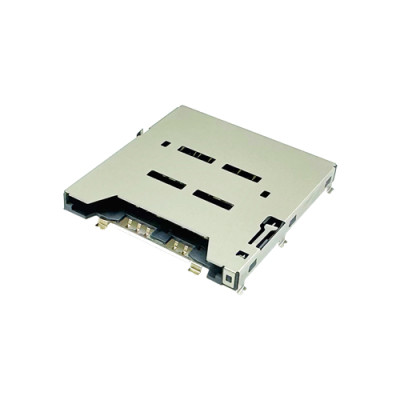
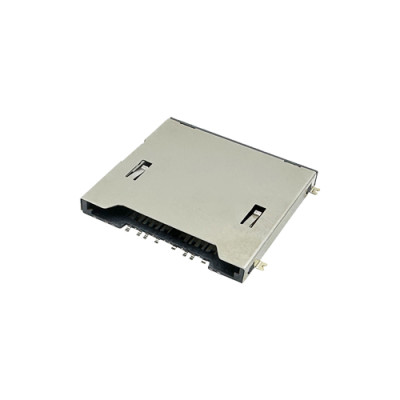
SD card connectors are electromechanical components that provide a secure interface between a circuit board and an SD or microSD card.
Unlike consumer-level adapters, industrial-grade SD card connectors are designed for high insertion/removal cycles, stable signal transmission, and resistance to vibration and environmental stress.
Common types include push-push or push-pull mechanisms, top/mid/reverse mount designs, and connectors with or without card detection switches.

How SD Card Connectors Work with Raspberry Pi
Most Raspberry Pi projects use SPI (Serial Peripheral Interface) to communicate with external SD card modules.
The key SPI signals include MOSI (Master Out Slave In), MISO (Master In Slave Out), SCK (Clock), and CS (Chip Select). These signals allow the Pi to read and write data via the SD card connector.
Important considerations: Raspberry Pi operates at 3.3V logic level, signal integrity depends heavily on connector quality, and poor connectors may cause data corruption or intermittent failure.
Step-by-Step: Connecting an SD Card Module via SPI
Hardware Required: Raspberry Pi / Raspberry Pi Pico, micro SD card module, jumper wires, external SD card connector (optional for custom design).
Basic Wiring: Connect CS to GPIO8, MOSI to GPIO10, MISO to GPIO9, SCK to GPIO11, VCC to 3.3V, and GND to GND.
Enable SPI Interface: Run sudo raspi-config → Interface Options → Enable SPI.
Software Setup: Install SPI libraries, use a FAT32 formatted SD card, and test read/write operations.
Real Maker Applications
• Data Logging Systems: Store sensor data locally without relying on network connectivity.
• IoT Edge Devices: Buffer data during network outages.
• Media Storage: Store images and videos in camera-based projects.
• Embedded Control Systems: Store configuration files or firmware updates.

Common Issues & Troubleshooting
• SD card not detected → Check SPI enabled
• Data corruption → Poor connector contact
• Intermittent reading → Weak mechanical retention
• Voltage mismatch → Ensure 3.3V compatibility
Using high-quality connectors, such as MOARCONN SD card connectors, greatly improves reliability.
Why Connector Quality Matters
From an engineering perspective, the SD card connector is not just a passive component—it directly affects signal integrity, system reliability, and product lifespan.
Low-quality connectors can lead to contact wear, poor impedance matching, and frequent connection loss.
Choosing a Reliable SD Card Connector
When selecting an SD card connector, consider mechanical reliability (high insertion cycle rating, strong retention), electrical performance (stable contact resistance, EMI shielding), and design compatibility (SMT/DIP mounting, compact footprint).
About MOARCONN
As a professional manufacturer of precision SD card connectors, MOARCONN specializes in delivering high-reliability solutions for industrial, IoT, and embedded applications.
With strong capabilities in precision stamping molds, injection molding integration, and automated assembly, MOARCONN ensures consistent product quality, stable signal performance, and fast customization for project needs.
Website: www.moarconn.com
From Module to Custom Design
While SD card modules are great for prototyping, professional projects often transition to direct PCB integration using SD card connectors, reducing size, lowering cost, and improving system stability.
Conclusion
Adding a reliable SD card connector to your Raspberry Pi project transforms your system from a basic prototype into a scalable, maintainable, and professional-grade solution. The right SD card connector makes all the difference.
FAQ
Q1: Can Raspberry Pi use external SD card connectors?
Yes, via SPI interface or USB card readers.
Q2: What voltage does an SD card module require?
Most operate at 3.3V logic level.
Q3: Why is my SD card not detected?
Check SPI settings, wiring, and connector quality. Using reliable solutions like MOARCONN connectors improves stability.
Q4: Module vs connector: which is better?
Modules are ideal for prototyping, while connectors are better for product design and mass production.